Free Google Ads worksheet · 7-page PDF
Free Google Ads starter worksheet for local businesses.
Plan your first campaign before you spend a dollar on clicks. Work out what a lead is worth, set a budget, plan keywords and negative keywords, and check your landing page and tracking, in one printable PDF.
- Uses your numbers, not industry averages
- Print it or fill it in on a tablet
- Made by a web studio in Auburn, Michigan
Get the free worksheet
We’ll email it to you right away.
* Required
We’ll send the worksheet, a few short emails with tips, then a weekly email with a useful read on the same topic. Unsubscribe anytime. We never sell or share your email. Privacy policy.
This site is protected by reCAPTCHA and the Google Privacy Policy and Terms of Service apply.
What’s inside
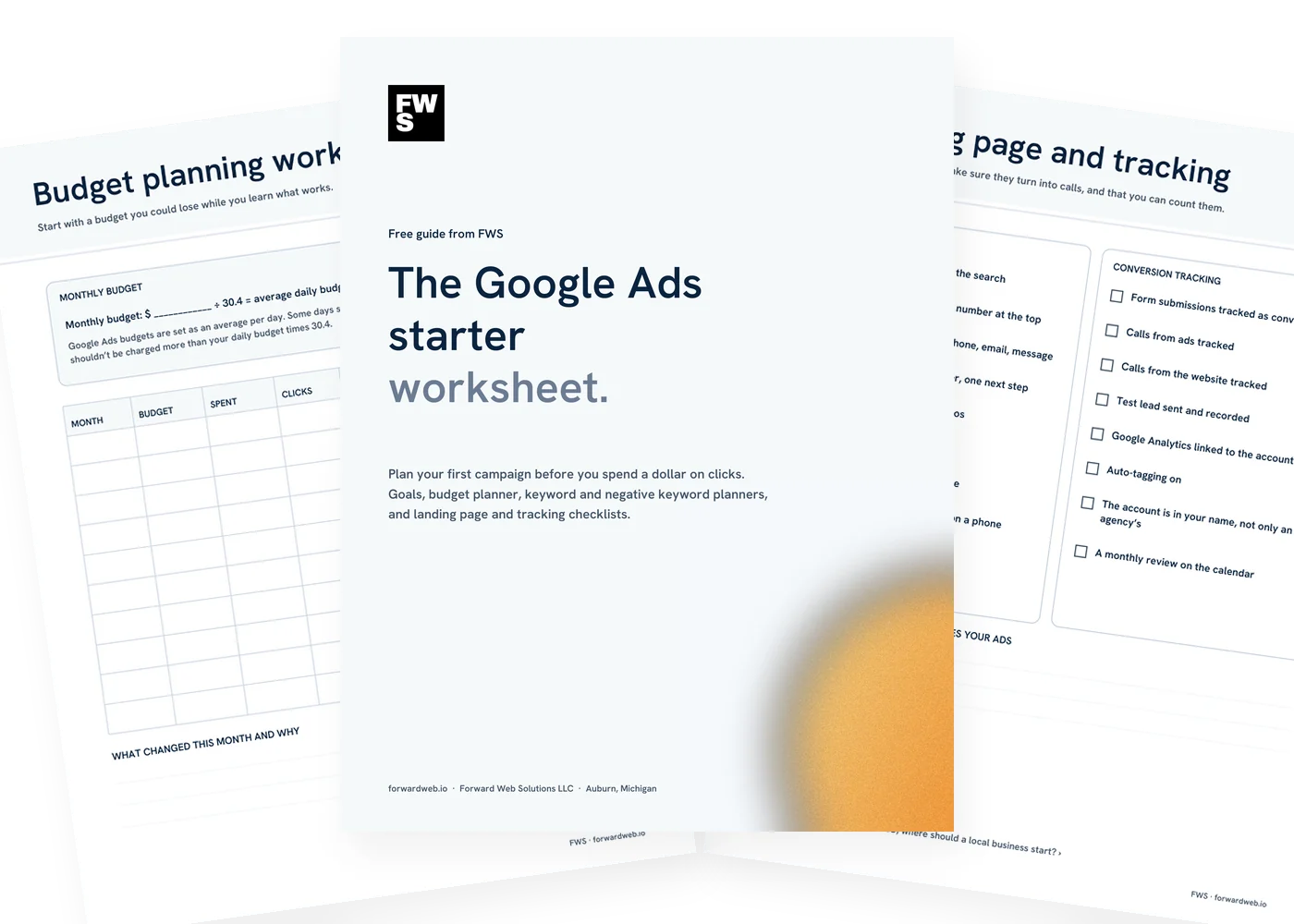
Seven pages. Plan it, budget it, track it.

Goals and lead value
What counts as a lead, which services to advertise, and what one lead is worth to you.

Budget planning worksheet
Turn a monthly budget into a daily one, then track spend, leads and customers month by month.

Keyword planner
Plan keywords by service and landing page, with a plain explanation of match types.

Negative keyword planner
Common searches to block before they waste your budget, plus space for your own.

Landing page and tracking
Two checklists: one to turn clicks into calls, one to make sure you can count them.

Help if you want it
Bring the worksheet to a free 20-minute call and we’ll tell you what a sensible start looks like.
The worksheet
Google Ads starter checklist. Every step before launch.
Most wasted ad spend comes from skipping the planning: no clear goal, no blocked searches, no tracking. Here is what the worksheet walks you through, and why.
1. Goals
Decide what you want from ads before you spend anything.
- Define a lead A phone call, a form, a booking. Pick what counts so you can measure it.
- Pick your most profitable services Advertise what you want more of, not everything you do.
- Set your area List the towns or the distance you actually serve.
- Know when you can answer Ads that ring an unanswered phone waste money. Note your hours.
2. What a lead is worth
Use your own numbers. There’s no universal answer.
- Average profit from one new customer Profit, not revenue, and over the first job or the first year, whichever you prefer.
- How many leads become customers Out of every 10 leads, how many do you win?
- What one lead is worth Profit per customer times the share of leads you win. That’s your ceiling.
- Your limit per lead Set the most you’re willing to pay, below that ceiling.
3. Budget
Start with a budget you could lose while you learn what works.
- Monthly to daily Google Ads budgets are set as an average per day. Divide your monthly budget by 30.4.
- Expect variation Some days spend more and some less. Over a month you shouldn’t be charged more than the daily budget times 30.4.
- Track it monthly Budget, spend, clicks, leads, cost per lead and customers won.
4. Keywords
Pick searches from people ready to hire you.
- Start with service plus place The words customers use, often with a town name.
- Choose match types on purpose Broad match reaches related searches; phrase and exact match stay closer to your words.
- Send each keyword to the right page A search for one service should land on the page about that service.
5. Negative keywords
Block searches that will never become customers.
- Job seekers Jobs, careers, hiring, salary.
- Do-it-yourselfers and learners How to, DIY, tutorial, course, training.
- Places and services you don’t cover Towns outside your area and work you don’t do.
- Check the search terms report weekly It shows what people actually typed. Add new negatives as you find them.
6. Landing page and tracking
Clicks are paid for. Make them count, and make sure you can count them.
- Headline matches the search If they searched for furnace repair, the page should say furnace repair.
- Click-to-call and a short form Phone number at the top, form fields kept to what you need.
- Conversions tracked and tested Forms and calls set up as conversions, with a test lead recorded before launch.
- The account is in your name If you ever change who manages it, the history and data stay with you.
Ads or SEO first?
Ads can bring in calls soon after launch, and you pay for every click. SEO takes longer and builds rankings you don’t pay for per click. Many local businesses use ads while SEO builds up. We break it down in Google Ads or SEO: where should a local business start?
About budgets and numbers
This worksheet doesn’t guess at click prices or results, because they vary by trade, town and season. Use your own numbers, start small, and let the tracking tell you what a lead really costs. Google explains how bids and budgets work if you want the details.
Before you launch
Conversion tracking checklist. Count every lead.
If you can’t see which clicks turned into calls, you can’t tell good spend from bad. Check these before the first ad runs, or see our Google Ads management.
- Form submissions tracked as conversions
- Calls from ads tracked
- Calls from the website tracked
- A test lead sent and recorded
- Google Analytics linked to the account
- Auto-tagging turned on
- The account owned by your business
- A monthly review on the calendar
Common questions
Questions about the worksheet.
Is the worksheet really free?
Yes. Enter your first name and email and we’ll send it right away. No credit card, and no call required.
Who is it for?
Owners of local businesses who are thinking about Google Ads, or who run ads now and want a clearer picture of what they get for the money.
How much should I spend on Google Ads?
It depends on your trade, your area and what a customer is worth to you. The worksheet helps you work out what a lead is worth and start with a budget you’re comfortable learning with, instead of a number someone guessed.
What are negative keywords?
Words that stop your ad from showing for searches you don’t want, like job searches or do-it-yourself questions. They’re one of the simplest ways to cut wasted spend.
Do I need a landing page?
You need a page that matches what people searched for and makes it easy to call or ask for a quote. Sometimes that’s an existing service page; sometimes a dedicated page works better.
What emails will I get?
The worksheet right away, then a few short emails with tips, then one short email a week with a useful read on the same topic. Every email has a one-click unsubscribe link, and we never sell or share your address.
Can FWS run my ads?
Yes. Bring the worksheet to a free 20-minute call and we’ll recommend a sensible start. See our Google Ads management.
Want help with your ads?
You plan it. We can run it.
Bring your worksheet to a free 20-minute call. We’ll tell you what a sensible starting budget and setup look like for your business. No pressure, no jargon.